> ## Documentation Index
> Fetch the complete documentation index at: https://developer.tryfinch.com/llms.txt
> Use this file to discover all available pages before exploring further.
# Webhooks
> Finch sends account update, job completion, and data change events via webhook. Register an endpoint in the Developer Dashboard to get your webhook secret.
New to Finch webhooks? Start with [Webhook Registration](/developer-resources/Webhooks#webhook-registration) to set up your endpoint and get your secret, then see [Webhook Verification](/developer-resources/Webhooks#webhook-verification) to learn how to validate incoming webhooks.
Webhooks are not available on our legacy Free or Build plans. [Upgrade](https://www.tryfinch.com/pricing) to Starter, Pro, or Premier for access.
## Webhook Payload Structure
### Common payload fields
Each webhook event contains the following fields in the response body:
| Field Name | Type | Description |
| --------------- | ------------- | ------------------------------------------------------------------------------------------------------------------------------------------------------------------------------------ |
| `company_id` | string\ | **Deprecated.** Use `connection_id` instead. |
| `account_id` | string\ | **Deprecated.** Use `connection_id` instead. |
| `connection_id` | string\ | Unique Finch id representing the connection between a developer's application and an employer's provider. Created when an employer successfully authenticates through Finch Connect. |
| `entity_id` | string\ | Unique Finch id of the entity within the connection for which data has been updated. Present when the connection spans multiple entities; `null` otherwise. |
| `event_type` | string | The type of webhook being delivered. |
| `data` | object | More information about the associated event. The structure of this object will vary per event type. |
Finch provides three general types of webhook events: account updates, job completions, and data changes.
### Account Updates
Account update events contain information about account connections, such as when a connection has been established or when a connection has entered an error state. This type of webhook has the following unique schema:
| Field Name | Type | Description |
| ---------------------------- | ------ | --------------------------------------------------------------------------------------------------------------------------------------------------------------------------------------------------------- |
| `event_type` | string | Always `account.updated`. |
| `data.status` | string | The status of the account. This follows our standard connection status schema. Options are `pending`, `processing`, `connected`, `reauth`, `error_permissions`, `error_no_account_setup`, `disconnected`. |
| `data.authentication_method` | string | The method of authentication used to connect this account. Options follow the standard Finch authentication types: `credential`, `api_token`, `oauth`, and `assisted`. |
Example:
```json theme={null}
{
"company_id": "720be419-0293-4d32-a707-32179b0827ab",
"account_id": "fa872170-b49d-4fb5-aa39-fb1515db0925",
"connection_id": "0057d3d2-fb43-4815-9f71-01ba4862d09f",
"event_type": "account.updated",
"data": {
"status": "connected",
"authentication_method": "assisted"
},
"entity_id": "61a9f5ba-95be-465d-a19b-34e19a07dd1c"
}
```
### Job Completion
Job completion events fire when a job finishes running, whether the final state is a success or an error.
Upon receiving a `job.{job_type}.completed` event, use the `job_url` in the payload to retrieve the job's final status.
| Event | Description | Values |
| ------------------------------------- | -------------------------------------------------------------------------------------- | -------------------------------------------------------------------------------------------- |
| `job.data_sync_all.completed` | Emitted for automated data sync jobs. Check status via the automated jobs endpoint. | — |
| `job.w4_form_employee_sync.completed` | Emitted for automated W4 form sync jobs. Check status via the automated jobs endpoint. | — |
| `job.initial_data_sync_*.succeeded` | Emitted when an initial data sync completes successfully for the first time. | `initial_data_sync_org`, `initial_data_sync_payroll` |
| `job.benefit_*.completed` | Emitted for benefit-related jobs. Check status via the manual jobs endpoint. | `benefit_create`, `benefit_register`, `benefit_enroll`, `benefit_unenroll`, `benefit_update` |
This type of webhook has the following `data` schema:
| Field Name | Type | Description |
| -------------- | ------------- | ----------------------------------------------------------------------------------------------------------------------------------------------------------- |
| `event_type` | string | Follows the schema `job.{job_type}.completed`. `{job_type}` can be any valid Finch job type such as `data_sync_all`, `benefit_create`, or `benefit_enroll`. |
| `data.job_id` | string\ | The id of the job which has completed. |
| `data.job_url` | string | The url to query the result of the job. |
Example:
```json theme={null}
{
"company_id": "720be419-0293-4d32-a707-32179b0827ab",
"account_id": "fa872170-b49d-4fb5-aa39-fb1515db0925",
"connection_id": "0057d3d2-fb43-4815-9f71-01ba4862d09f",
"event_type": "job.benefit_enroll.completed",
"data": {
"job_id": "10f249d5-c974-4ce3-979a-31164323a34f",
"job_url": "https://api.tryfinch.com/jobs/10f249d5-c974-4ce3-979a-31164323a34f"
},
"entity_id": "282e6177-e2ec-4197-801d-7ab16c2b0c99"
}
```
### Data Changes
Data change events fire when any data for a connection changes after Finch's initial data sync. These could be `created`, `updated`, or `deleted` events on any of our endpoints. One event fires per changed record — for example, if 10 individuals are updated across Directory, Employment, or Individual, Finch sends 10 separate events. This type of event has the following schema:
| Field Name | Type | Description |
| ------------ | ------ | ---------------------------------------------------------------------------------------------------------------------------------------------------------------------------------------------------------------------------------------------------------------------------------------------------- |
| `event_type` | string | Follows the schema `{endpoint}.{created\|updated\|deleted}`. `{endpoint}` can be any Finch endpoint such as `company`, `directory`, `individual`, etc. You can see the full up-to-date list of events by registering an endpoint in our [developer dashboard](https://dashboard.tryfinch.com/login). |
| `data` | object | The data object schema will change depending on the endpoint. |
The possible `data` schemas per endpoint are as follows:
| Endpoint | Event types | `data` fields |
| --------------- | ------------------------------------------------------------------------- | ----------------------------- |
| `company` | `company.updated` only | `null` |
| `directory` | `directory.created`, `directory.updated`, `directory.deleted` | `individual_id` |
| `employment` | `employment.created`, `employment.updated`, `employment.deleted` | `individual_id` |
| `individual` | `individual.created`, `individual.updated`, `individual.deleted` | `individual_id` |
| `payment` | `payment.created`, `payment.updated`, `payment.deleted` | `payment_id`, `pay_date` |
| `pay_statement` | `pay_statement.created`, `pay_statement.updated`, `pay_statement.deleted` | `payment_id`, `individual_id` |
Examples:
```json Company theme={null}
{
"company_id": "720be419-0293-4d32-a707-32179b0827ab",
"account_id": "fa872170-b49d-4fb5-aa39-fb1515db0925",
"connection_id": "0057d3d2-fb43-4815-9f71-01ba4862d09f",
"event_type": "company.updated",
"data": null,
"entity_id": "61a9f5ba-95be-465d-a19b-34e19a07dd1c"
}
```
```json Individual theme={null}
{
"company_id": "720be419-0293-4d32-a707-32179b0827ab",
"account_id": "fa872170-b49d-4fb5-aa39-fb1515db0925",
"connection_id": "0057d3d2-fb43-4815-9f71-01ba4862d09f",
"event_type": "individual.updated",
"data": {
"individual_id": "9987ecd1-6c6e-4d97-81ae-4d0248dbdb3d"
},
"entity_id": "61a9f5ba-95be-465d-a19b-34e19a07dd1c"
}
```
```json Pay Statement theme={null}
{
"company_id": "720be419-0293-4d32-a707-32179b0827ab",
"account_id": "fa872170-b49d-4fb5-aa39-fb1515db0925",
"connection_id": "0057d3d2-fb43-4815-9f71-01ba4862d09f",
"event_type": "pay_statement.created",
"data": {
"payment_id": "1c5e7bf2-94ce-4041-bf59-98e95677be21",
"individual_id": "9987ecd1-6c6e-4d97-81ae-4d0248dbdb3d"
},
"entity_id": "61a9f5ba-95be-465d-a19b-34e19a07dd1c"
}
```
**Note:** One event is created for each pay statement object that has changed. For example, a new pay run for 20 individuals generates 20 unique pay statement events.
## Supported Events
| Event | Automated | Assisted |
| --------------- | ---------- | ----------------- |
| Account Updates | ✓ | ✓ |
| Job Completion | All events | Benefit jobs only |
| Data Changes | ✓ | — |
## Required Events
The following events cover the core connection lifecycle. Any application integrating with Finch must handle them.
| Event | When to handle | Action |
| ----------------------------------------- | ----------------------------------- | -------------------------------------------------------------------------------------------------------------------------------------------------------------------------------------------------------------------- |
| `account.updated` | `data.status` is `reauth` | Prompt the employer to re-authenticate via Finch Connect. See [Reauthentication](/developer-resources/Reauthentication). |
| `job.initial_data_sync_org.succeeded` | Initial org data sync completes | Begin reading org endpoints. Requests made before this event may return `202` or `500`. |
| `job.initial_data_sync_payroll.succeeded` | Initial payroll data sync completes | Begin reading payroll endpoints. Requests made before this event may return `202` or `500`. |
| `job.benefit_*.completed` | A benefit write job finishes | Call [Retrieve a Manual Job](/api-reference/management/retrieve-a-manual-job) with `data.job_id` to check the outcome — the event fires on both success and failure. Required if your application writes deductions. |
## Webhook Registration
Webhook endpoints should use HTTPS and expect to receive POST requests with the following headers:
```json theme={null}
{
"Content-Type": "application/json",
"Finch-Event-Id": "msg_2SFMDibF3lmRw8DzX4t1JjiEZQl",
"Finch-Signature": "v1,8rFENj/WpNAMx+Kh5R1NLQunmpaBx4vOntjJdbGKbvM=",
"Finch-Timestamp": "1688737757"
}
```
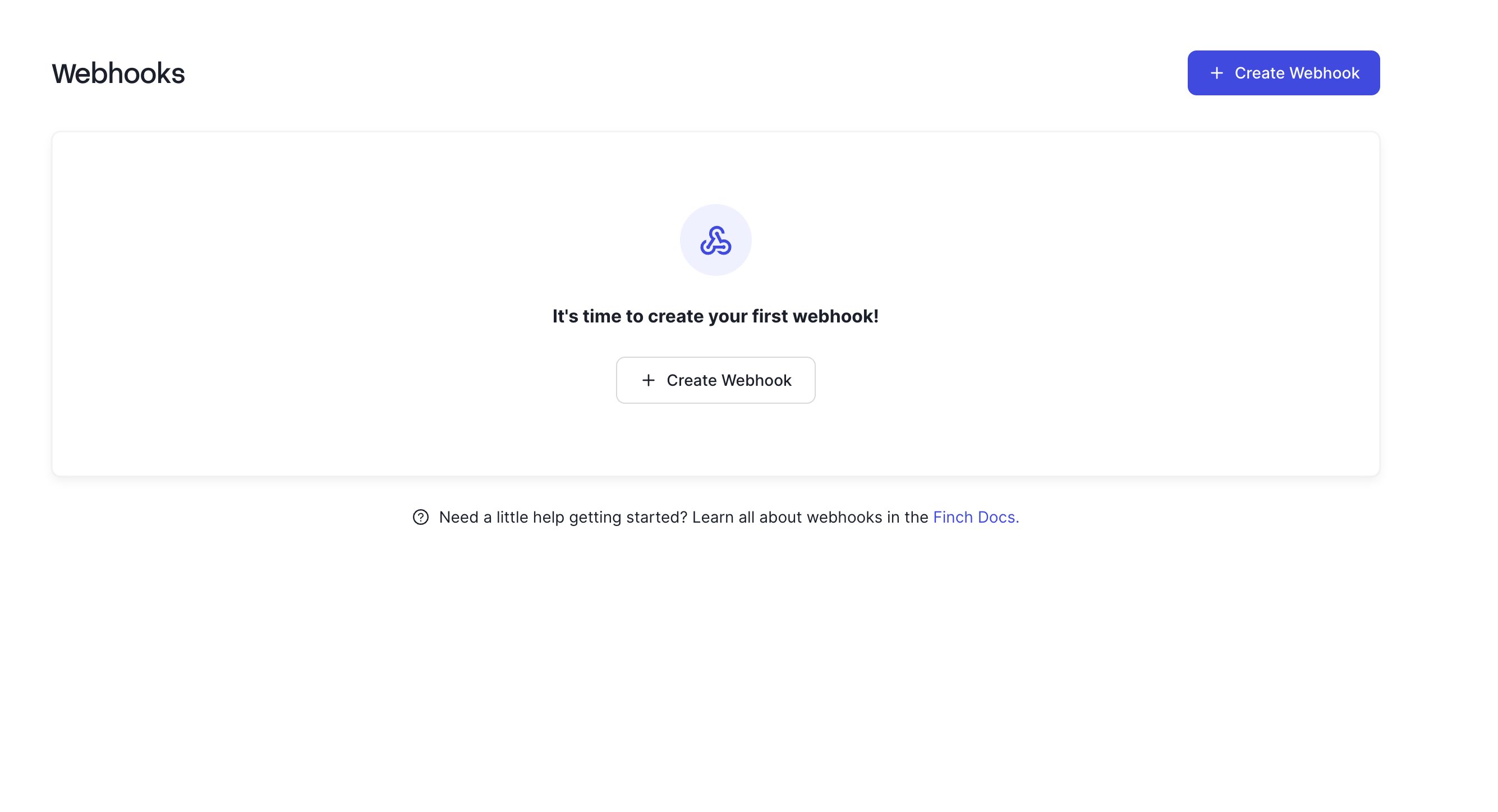
You can create webhooks via the [Finch Developer Dashboard](https://dashboard.tryfinch.com/).
 After registering a webhook, Finch displays a **webhook secret**. This **secret** validates that incoming webhooks were sent by Finch.
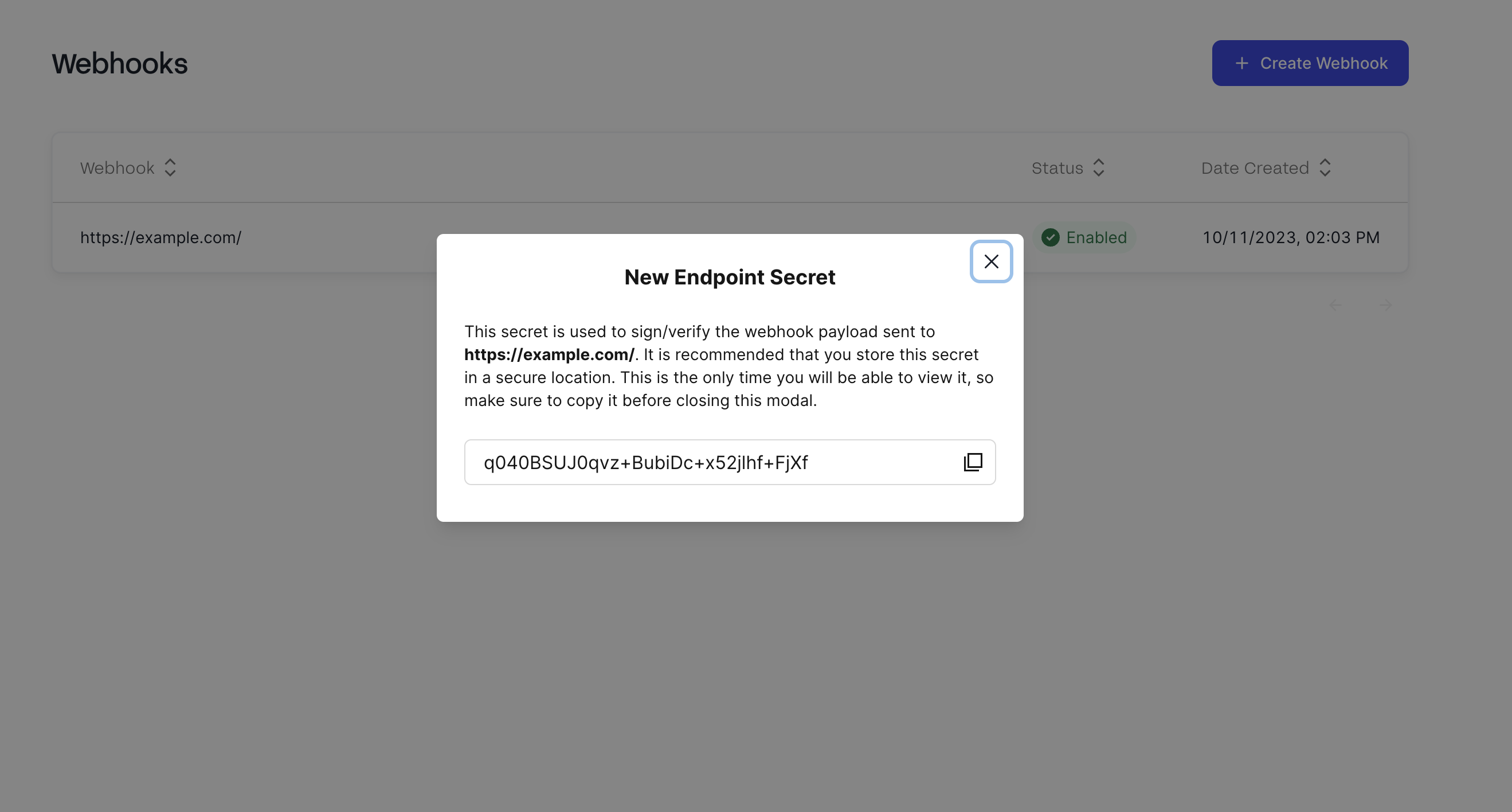 The **secret** is displayed only once. Store it immediately. See the Webhook Verification section for more details.
## Webhook Verification
Finch uses HMAC-SHA256 webhook verification. To verify a webhook using the `Finch-Signature` header:
1. **Extract the signature from the header**. The `Finch-Signature` header consists of a list of signatures (where the signature content begins after "v1," and is space delimited) to account for secret rotations; there may be multiple signatures present for cases where a secret was rotated. During the verification process, the signature must match at least one signature in the list to be considered valid.
```text theme={null}
v1,g0hM9SsE+OTPJTGt/tmIKtSyZlE3uFJELVlNIOLJ1OE= v1,bm9ldHUjKzFob2VudXRob2VodWUzMjRvdWVvdW9ldQo= v2,MzJsNDk4MzI0K2VvdSMjMTEjQEBAQDEyMzMzMzEyMwo=
```
2. **Generate the webhook signature**
* First, base64 decode the webhook secret to get the raw bytes.
* Then, using the decoded webhook secret, hash the webhook content in the form `{webhook_id}.{webhook_timestamp}.{body}` where `webhook_id` is the `Finch-Event-Id`, `webhook_timestamp` is the `Finch-Timestamp`, and `body` is the raw request body. The signature is sensitive to any change in the body — do not modify it before verifying. If the computed signature does not match any signature in the `Finch-Signature` header, reject the webhook. Use a constant-time comparison to avoid timing attacks.
```javascript Javascript theme={null}
const crypto = require("crypto");
const signedContent = `${webhook_id}.${webhook_timestamp}.${body}`;
const SECRET = "5WbX5kEWLlfzsGNjH64I8lOOqUB6e8FH";
// base64 decode the secret before use
const secretBytes = new Buffer(SECRET, "base64");
const signature = crypto
.createHmac("sha256", secretBytes)
.update(signedContent)
.digest("base64");
```
```python Python theme={null}
import hmac
import base64
signedContent = f"{webhook_id}.{webhook_timestamp}.{body}"
SECRET = "5WbX5kEWLlfzsGNjH64I8lOOqUB6e8FH"
# base64 decode the secret before use
secretBytes = base64.b64decode(SECRET)
signature = base64.b64encode(
hmac.new(
secretBytes,
signedContent.encode(),
'sha256'
).digest()
).decode()
```
```java Java theme={null}
import javax.crypto.Mac;
import javax.crypto.spec.SecretKeySpec;
import java.nio.charset.StandardCharsets;
import java.util.Base64;
public class Main {
public static void main(String[] args) throws Exception {
String signedContent = webhook_id + "." + webhook_timestamp + "." + body;
String SECRET = "5WbX5kEWLlfzsGNjH64I8lOOqUB6e8FH";
// Need to base64 decode the secret
byte[] secretBytes = Base64.getDecoder().decode(SECRET);
Mac sha256_HMAC = Mac.getInstance("HmacSHA256");
SecretKeySpec secret_key = new SecretKeySpec(secretBytes, "HmacSHA256");
sha256_HMAC.init(secret_key);
byte[] rawHmac = sha256_HMAC.doFinal(signedContent.getBytes(StandardCharsets.UTF_8));
// base64 encode the result
String signature = Base64.getEncoder().encodeToString(rawHmac);
System.out.println(signature);
}
}
```
3. **Verify the webhook timestamp.** If the signature is valid, check that the timestamp is within five minutes of the current time. If it is not, reject the webhook. Using outdated webhooks increases susceptibility to [replay attacks](https://en.wikipedia.org/wiki/Replay_attack).
The [Finch Backend SDKs](/developer-resources/SDKs) encapsulate all of this logic to simplify the webhook verification process.
```javascript Javascript (express.js) theme={null}
import Finch from '@tryfinch/finch-api';
...
app.use('/webhooks/finch', bodyParser.text({ type: '_/_' }), function (req, res) {
const finch = new Finch();
const payload = finch.webhooks.unwrap(req.body, req.headers, process.env['FINCH_WEBHOOK_SECRET']); // env var used by default; explicit here.
console.log(payload);
res.json({ ok: true });
});
```
```python Python (FastAPI) theme={null}
from finch import Finch
...
@app.post('/webhooks/finch')
async def handler(request: Request):
body = await request.body() # raw JSON string sent from the server
secret = os.environ['FINCH_WEBHOOK_SECRET'] # env var used by default; explicit here.
client = Finch()
payload = client.webhooks.unwrap(body, request.headers, secret)
print(payload)
return {'ok': True}
```
```java Java (SpringBoot) theme={null}
import com.tryfinch.api.client.FinchClient;
import com.tryfinch.api.client.okhttp.FinchOkHttpClient;
...
@RestController
public class WebhookController {
@PostMapping("/webhooks/finch")
public HttpStatus handleWebhook(HttpServletRequest request, @RequestBody String payload) {
try {
FinchClient finch = FinchOkHttpClient.builder().webhookSecret("your-secret").build();
// Implement this to get headers from request as a ListMultimap
ListMultimap headers = this.getHeadersFromRequest(request);
// Validate signature
finch.webhooks().verifySignature(payload, headers, null);
// Implement this to handle webhook payload
this.handleWebhookPayload(payload);
} catch (Exception e) {
// Handle exception
return HttpStatus.INTERNAL_SERVER_ERROR;
}
return HttpStatus.OK;
}
}
```
```kotlin Kotlin (SpringBoot) theme={null}
import com.tryfinch.api.client.FinchClient
import com.tryfinch.api.client.okhttp.FinchOkHttpClient
...
@RestController
class WebhookController {
@PostMapping("/webhooks/finch")
fun handleWebhook(request: HttpServletRequest, @RequestBody payload: String): HttpStatus {
try {
val finch = FinchOkHttpClient.builder().webhookSecret("your-secret").build()
// Implement this function to get headers from request as a ListMultimap
val headers = getHeadersFromRequest(request)
// Validate signature
finch.webhooks().verifySignature(payload, headers, null)
// Implement this to handle webhook payload
handleWebhookPayload(payload)
} catch (e: Exception) {
// Handle exception
return HttpStatus.INTERNAL_SERVER_ERROR
}
return HttpStatus.OK
}
}
```
```go Go (net/http) theme={null}
import (
finchgo "github.com/Finch-API/finch-api-go"
...
)
func webhookHandler(w http.ResponseWriter, r *http.Request) {
header := r.Header
secret := os.Getenv("FINCH_WEBHOOK_SECRET")
now := time.Now()
b, err := ioutil.ReadAll(r.Body)
if err != nil {
panic(err)
}
client := finchgo.NewClient()
err = client.Webhooks.VerifySignature([]byte(b), header, secret, now)
if err != nil {
fmt.Println("Error with signature")
os.Exit(1)
}
fmt.Fprintf(w, "Response to finch webhook")
}
func TestAppServer() {
http.HandleFunc("/webhooks/finch", webhookHandler)
log.Fatal(http.ListenAndServe(":8081", nil))
}
```
## Testing Webhooks
You can send a test request to any webhook through the developer dashboard.
The **secret** is displayed only once. Store it immediately. See the Webhook Verification section for more details.
## Webhook Verification
Finch uses HMAC-SHA256 webhook verification. To verify a webhook using the `Finch-Signature` header:
1. **Extract the signature from the header**. The `Finch-Signature` header consists of a list of signatures (where the signature content begins after "v1," and is space delimited) to account for secret rotations; there may be multiple signatures present for cases where a secret was rotated. During the verification process, the signature must match at least one signature in the list to be considered valid.
```text theme={null}
v1,g0hM9SsE+OTPJTGt/tmIKtSyZlE3uFJELVlNIOLJ1OE= v1,bm9ldHUjKzFob2VudXRob2VodWUzMjRvdWVvdW9ldQo= v2,MzJsNDk4MzI0K2VvdSMjMTEjQEBAQDEyMzMzMzEyMwo=
```
2. **Generate the webhook signature**
* First, base64 decode the webhook secret to get the raw bytes.
* Then, using the decoded webhook secret, hash the webhook content in the form `{webhook_id}.{webhook_timestamp}.{body}` where `webhook_id` is the `Finch-Event-Id`, `webhook_timestamp` is the `Finch-Timestamp`, and `body` is the raw request body. The signature is sensitive to any change in the body — do not modify it before verifying. If the computed signature does not match any signature in the `Finch-Signature` header, reject the webhook. Use a constant-time comparison to avoid timing attacks.
```javascript Javascript theme={null}
const crypto = require("crypto");
const signedContent = `${webhook_id}.${webhook_timestamp}.${body}`;
const SECRET = "5WbX5kEWLlfzsGNjH64I8lOOqUB6e8FH";
// base64 decode the secret before use
const secretBytes = new Buffer(SECRET, "base64");
const signature = crypto
.createHmac("sha256", secretBytes)
.update(signedContent)
.digest("base64");
```
```python Python theme={null}
import hmac
import base64
signedContent = f"{webhook_id}.{webhook_timestamp}.{body}"
SECRET = "5WbX5kEWLlfzsGNjH64I8lOOqUB6e8FH"
# base64 decode the secret before use
secretBytes = base64.b64decode(SECRET)
signature = base64.b64encode(
hmac.new(
secretBytes,
signedContent.encode(),
'sha256'
).digest()
).decode()
```
```java Java theme={null}
import javax.crypto.Mac;
import javax.crypto.spec.SecretKeySpec;
import java.nio.charset.StandardCharsets;
import java.util.Base64;
public class Main {
public static void main(String[] args) throws Exception {
String signedContent = webhook_id + "." + webhook_timestamp + "." + body;
String SECRET = "5WbX5kEWLlfzsGNjH64I8lOOqUB6e8FH";
// Need to base64 decode the secret
byte[] secretBytes = Base64.getDecoder().decode(SECRET);
Mac sha256_HMAC = Mac.getInstance("HmacSHA256");
SecretKeySpec secret_key = new SecretKeySpec(secretBytes, "HmacSHA256");
sha256_HMAC.init(secret_key);
byte[] rawHmac = sha256_HMAC.doFinal(signedContent.getBytes(StandardCharsets.UTF_8));
// base64 encode the result
String signature = Base64.getEncoder().encodeToString(rawHmac);
System.out.println(signature);
}
}
```
3. **Verify the webhook timestamp.** If the signature is valid, check that the timestamp is within five minutes of the current time. If it is not, reject the webhook. Using outdated webhooks increases susceptibility to [replay attacks](https://en.wikipedia.org/wiki/Replay_attack).
The [Finch Backend SDKs](/developer-resources/SDKs) encapsulate all of this logic to simplify the webhook verification process.
```javascript Javascript (express.js) theme={null}
import Finch from '@tryfinch/finch-api';
...
app.use('/webhooks/finch', bodyParser.text({ type: '_/_' }), function (req, res) {
const finch = new Finch();
const payload = finch.webhooks.unwrap(req.body, req.headers, process.env['FINCH_WEBHOOK_SECRET']); // env var used by default; explicit here.
console.log(payload);
res.json({ ok: true });
});
```
```python Python (FastAPI) theme={null}
from finch import Finch
...
@app.post('/webhooks/finch')
async def handler(request: Request):
body = await request.body() # raw JSON string sent from the server
secret = os.environ['FINCH_WEBHOOK_SECRET'] # env var used by default; explicit here.
client = Finch()
payload = client.webhooks.unwrap(body, request.headers, secret)
print(payload)
return {'ok': True}
```
```java Java (SpringBoot) theme={null}
import com.tryfinch.api.client.FinchClient;
import com.tryfinch.api.client.okhttp.FinchOkHttpClient;
...
@RestController
public class WebhookController {
@PostMapping("/webhooks/finch")
public HttpStatus handleWebhook(HttpServletRequest request, @RequestBody String payload) {
try {
FinchClient finch = FinchOkHttpClient.builder().webhookSecret("your-secret").build();
// Implement this to get headers from request as a ListMultimap
ListMultimap headers = this.getHeadersFromRequest(request);
// Validate signature
finch.webhooks().verifySignature(payload, headers, null);
// Implement this to handle webhook payload
this.handleWebhookPayload(payload);
} catch (Exception e) {
// Handle exception
return HttpStatus.INTERNAL_SERVER_ERROR;
}
return HttpStatus.OK;
}
}
```
```kotlin Kotlin (SpringBoot) theme={null}
import com.tryfinch.api.client.FinchClient
import com.tryfinch.api.client.okhttp.FinchOkHttpClient
...
@RestController
class WebhookController {
@PostMapping("/webhooks/finch")
fun handleWebhook(request: HttpServletRequest, @RequestBody payload: String): HttpStatus {
try {
val finch = FinchOkHttpClient.builder().webhookSecret("your-secret").build()
// Implement this function to get headers from request as a ListMultimap
val headers = getHeadersFromRequest(request)
// Validate signature
finch.webhooks().verifySignature(payload, headers, null)
// Implement this to handle webhook payload
handleWebhookPayload(payload)
} catch (e: Exception) {
// Handle exception
return HttpStatus.INTERNAL_SERVER_ERROR
}
return HttpStatus.OK
}
}
```
```go Go (net/http) theme={null}
import (
finchgo "github.com/Finch-API/finch-api-go"
...
)
func webhookHandler(w http.ResponseWriter, r *http.Request) {
header := r.Header
secret := os.Getenv("FINCH_WEBHOOK_SECRET")
now := time.Now()
b, err := ioutil.ReadAll(r.Body)
if err != nil {
panic(err)
}
client := finchgo.NewClient()
err = client.Webhooks.VerifySignature([]byte(b), header, secret, now)
if err != nil {
fmt.Println("Error with signature")
os.Exit(1)
}
fmt.Fprintf(w, "Response to finch webhook")
}
func TestAppServer() {
http.HandleFunc("/webhooks/finch", webhookHandler)
log.Fatal(http.ListenAndServe(":8081", nil))
}
```
## Testing Webhooks
You can send a test request to any webhook through the developer dashboard.
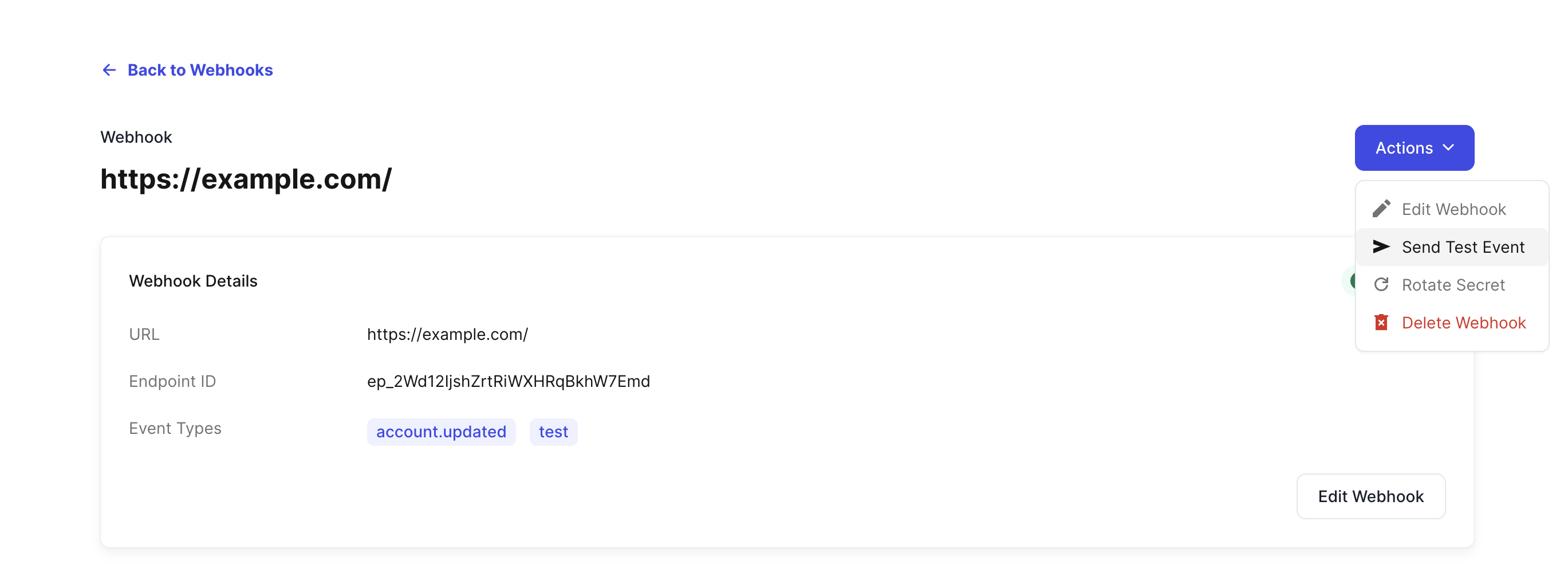 The test webhook uses the same structure as data change webhooks, with `event_type` set to `test`.
## Retry schedule
Upon failure, Finch retries according to the following schedule with exponential backoff:
* Immediately
* 5 seconds
* 5 minutes
* 30 minutes
* 2 hours
If all retries are exhausted without a successful delivery, the event is dropped. Use the Finch API to fetch current data for any records you suspect may have been missed.
## Best practices
### Responding to Webhooks
To prevent unnecessary retries, receive and process webhook events in separate processes. Respond immediately with a `200` to indicate successful delivery, then process the event asynchronously.
### Event Delivery and Ordering
* You may occasionally receive the same webhook event more than once. Use the `Finch-Event-Id` to implement idempotent event processing.
* Finch does not guarantee delivery of events in the order they happen. For example, you may receive an `update` event for an `individual` before a `created` event. You should also use the Finch API to occasionally fetch any missing data. For example, you can fetch an individual if you happen to receive an `update` event first.
### Event Mapping
* Each webhook includes a `connection_id` identifying the employer connection. Use it to route incoming events to the right employer in your system. For details on capturing and storing the `connection_id`, see [Retrieve Access Token](/implementation-guide/Connect/Retrieve-Access-Token).
* Each webhook also includes an `entity_id` for the specific entity within that connection. For multi-entity connections, the `entity_id` is required in subsequent API requests.
The test webhook uses the same structure as data change webhooks, with `event_type` set to `test`.
## Retry schedule
Upon failure, Finch retries according to the following schedule with exponential backoff:
* Immediately
* 5 seconds
* 5 minutes
* 30 minutes
* 2 hours
If all retries are exhausted without a successful delivery, the event is dropped. Use the Finch API to fetch current data for any records you suspect may have been missed.
## Best practices
### Responding to Webhooks
To prevent unnecessary retries, receive and process webhook events in separate processes. Respond immediately with a `200` to indicate successful delivery, then process the event asynchronously.
### Event Delivery and Ordering
* You may occasionally receive the same webhook event more than once. Use the `Finch-Event-Id` to implement idempotent event processing.
* Finch does not guarantee delivery of events in the order they happen. For example, you may receive an `update` event for an `individual` before a `created` event. You should also use the Finch API to occasionally fetch any missing data. For example, you can fetch an individual if you happen to receive an `update` event first.
### Event Mapping
* Each webhook includes a `connection_id` identifying the employer connection. Use it to route incoming events to the right employer in your system. For details on capturing and storing the `connection_id`, see [Retrieve Access Token](/implementation-guide/Connect/Retrieve-Access-Token).
* Each webhook also includes an `entity_id` for the specific entity within that connection. For multi-entity connections, the `entity_id` is required in subsequent API requests.